Export from Objects (with Custom Filters)
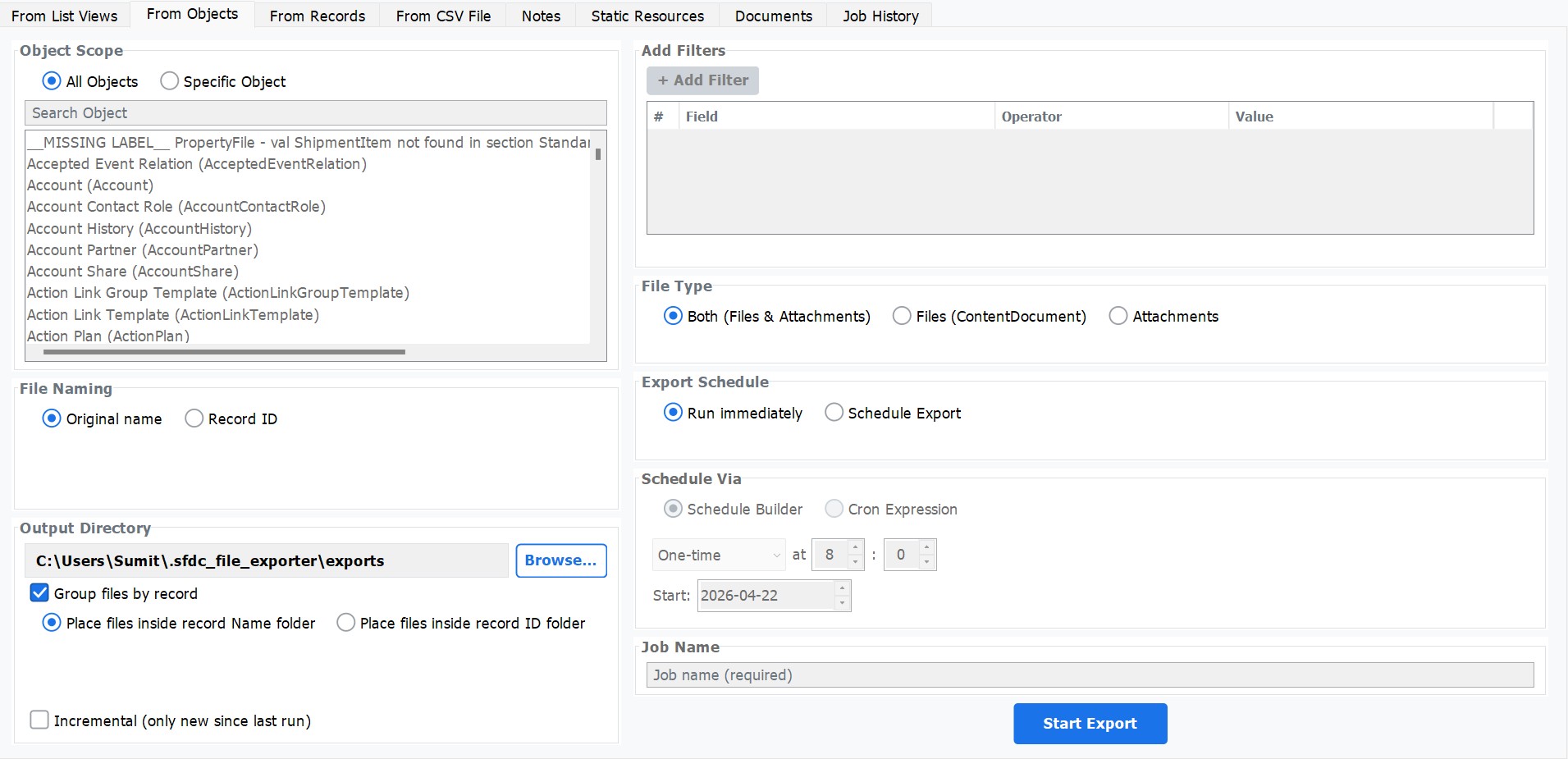
The Object export mode lets you target all records of a specific Salesforce object — or your entire org — and download every attached file in one operation. Build unlimited field-level filters to narrow exactly which records are included, and use incremental mode to keep recurring backups efficient.
How to Use
Select Export Type
Choose Export from Objects from the main menu or the sidebar navigation.
Choose Scope
Select All Objects to export files from every record across your entire org, or select Specific Object and choose the object from the dropdown — for example, Account, Case, Opportunity, or any custom object.
Add Filters (Optional)
Click Add Filter to define field-level conditions. Each filter has three parts: Field, Operator (Equals, Contains, Greater Than, etc.), and Value. Add as many filters as needed — all conditions are combined with AND logic.
Enable Incremental Mode (Optional)
Toggle Incremental Export to skip files that were already exported in a previous run. The app tracks the last export date automatically — only files created or modified since then will be downloaded.
Choose File Type, Output Folder & Export
Select Files (ContentDocument), Attachments, or both. Click Browse to set your destination folder, then click Export to start the download.
Filter Operators
When adding field-level filters, the Operator dropdown determines how the field value is compared against your input. The table below lists every supported operator and when to use it.
| Operator | Behavior | Example use |
|---|---|---|
Equals |
Field value must exactly match the supplied value (case-insensitive for text fields). | Status Equals Active |
Not Equals |
Field value must differ from the supplied value — all other values pass the filter. | Stage Not Equals Closed Lost |
Contains |
Field value must contain the supplied string anywhere within it (substring match). | Name Contains Acme |
Starts With |
Field value must begin with the supplied string. | AccountNumber Starts With ACC-2024 |
Greater Than |
Field value must be strictly greater than the supplied value. Applies to numeric, currency, and date fields. | Amount Greater Than 10000 |
Less Than |
Field value must be strictly less than the supplied value. Applies to numeric, currency, and date fields. | CreatedDate Less Than 2023-01-01 |
Greater Than or Equal |
Field value must be greater than or equal to the supplied value. Inclusive boundary. | NumberOfEmployees Greater Than or Equal 500 |
Less Than or Equal |
Field value must be less than or equal to the supplied value. Inclusive boundary. | LastModifiedDate Less Than or Equal 2024-12-31 |
YYYY-MM-DD format (e.g., 2024-06-01). The app handles the Salesforce SOQL conversion automatically.